

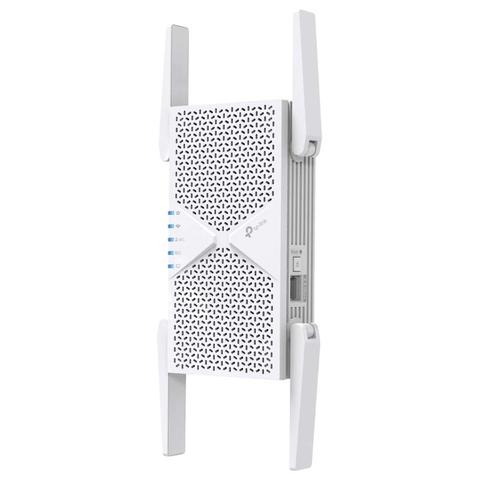

TP-Link RE405BE BE6500 Dual-Band Wi-Fi 7 Range Extender
Buy at PC Case GearWe may earn a commission if you buy; it doesn't change your price. Check the price at PC Case Gear before you buy. How we make money
Price history
Tracking since today
The price hasn't changed since we started tracking it. We'll show its history once it does.
Available at 2 stores
Stores may pay us a commission when you buy; it doesn't affect the order or your price. Learn more
- Mwave $349 Cheapest In stock Checked 3 days ago Buy
- PC Case Gear This page $349 In stock Checked todayBuy

About this product
- Brand
- TP-Link
- Store
- PC Case Gear
- Category
- Electronics > Networking > Bridges & Routers > Mesh WiFi Systems
- SKU
- RE405BE
The TP-Link RE405BE BE6500 Dual-Band Wi-Fi 7 Range Extender delivers super fast speeds up to 6.5 Gbps across 5 GHz and 2.4 GHz bands, with 4 external antennas and Multi Link Operation for stronger, more reliable coverage. Equipped with a 2.5 Gbps Multi-Gig Ethernet port, EasyMesh compatibility, and effortless setup with a WPS link button. It extends Wi-Fi throughout the home or office while reducing dead zones.
Features

BE6500 Dual-Band Wi-Fi 7 Range Extender
- Lightning-Fast 6.5 Gbps Dual-Band Wi-Fi 7: 5764 Mbps (5 GHz) + 688 Mbps (2.4 GHz).
- Multi-Link Operation (MLO): Increases throughput, reduces latency, and improves reliability for emerging applications.
- 2.5G Multi-Gigabit Ethernet Port: 1x 2.5 Gbps port ensures max flexibility and boosted throughput.
- Smart Roaming: Walk from room to room and stay connected with the fastest possible speeds.
- EasyMesh-Compatible: Works with EasyMesh routers and range extenders to form seamless whole home Mesh Wi-Fi, preventing drops and lag when moving between signals.
- Easy Setup: Plug in and then easily set up via a press of the WPS button or via the Tether App.
- Great Compatibility: Works with all Wi-Fi generations and devices and all internet providers.
- 4K-QAM, 160 MHz Bandwidth, 4 Antennas
- Higher Device Capacity
- Works with any Wi-Fi Router
Wi-Fi 7 — Wi-Fi Like Never Before
Wi-Fi 7 offers accelerated throughput, lower latency, stronger anti-jamming, and higher efficiency. Join the league of pros and experience the sheer performance of the next generation of Wi-Fi.
- 8K Streaming
- Video Conferencing
- Online Gaming
- VR/AR

6.5 Gbps Lightning-Fast Dual-Band Wi-Fi with MLO
Enhance your home's connectivity with this Dual-Band Wi-Fi 7 Range Extender, delivering impressive speeds up to 6.5 Gbps. This device ensures robust and reliable coverage throughout your entire home, effectively eliminating Wi-Fi dead zones.
- 6.5 Gbps Dual-Band Wi-Fi
- Ultra Smooth Wi-Fi with 4x Lower Latency
- Higher Transmission Efficiency with 4K-QAM
- Higher Capacity for More Devices

Ultra-Fast 2.5 Gbps Wired Connection
Range Extender Mode
Plug your PC, smart TV, or game console into the 2.5 Gbps port for a blazing-fast wired connection.
Access Point Mode
Connect the RE405BE to your router to convert a 2.5 Gbps wired connection into a high-speed dual-band wireless signal.

Effortlessly Expand Your Wi-Fi Coverage
Eliminate Wi-Fi dead zones in your home with the RE405BE Range Extender. This device wirelessly connects to your router, amplifying and extending its signal to reach areas previously out of range. Enjoy reliable, seamless Wi-Fi coverage throughout your home or office, with minimised signal interference for a smoother connection.
EasyMesh — Flexibly Create Whole Home Mesh Wi-Fi
The RE405BE is EasyMesh-compatible. Pair with an EasyMesh-compatible router to eliminate weak spots and create seamless whole-home Wi-Fi, ensuring every corner of your home stays connected.
- WiFi Dead Zone Killer: Eliminate weak signal areas with Wi-Fi coverage for the whole house
- Smart Roaming: Uninterrupted streaming when moving around your home
- One WiFi Name: No more switching Wi-Fi network names
- Unified Management: Manage your whole home Wi-Fi from the central node via the Tether app/Web UI

Wide.Wider.Widest
Keep your internet focused on a single room or blanket an entire floor with Wi-Fi by picking between 3 strength levels on the Tether app.
Effortless One-Touch Setup
Press the WPS button on your router and extender to expand your Wi-Fi coverage in seconds.
Press the WPS button on your router and the RE405BE.
Relocate the RE405BE to the best place with smart signal indicator.

Control at Your Fingertips
Set up and manage your Wi-Fi, including TP-Link routers and range extenders, from your Android or iOS phone with the TP-Link Tether app.