

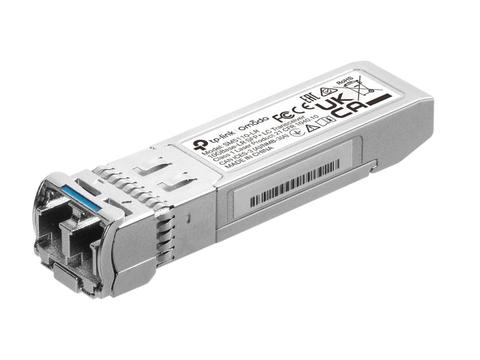

TP-Link TL-SM5110-LR 10GBase-LR SFP+ LC Transceiver Hot-Pluggable, Supports Digital Diagnostic Monitoring, SFP+ MSA Compatible, 10KM
In stock at PC LAN
Price checked today
We may earn a commission if you buy; it doesn't change your price. Check the price at PC LAN before you buy. How we make money
Price history
Tracking since today
The price hasn't changed since we started tracking it. We'll show its history once it does.
About this product
Overview
Omada 10GBase-LR SFP+ LC Transceiver
- Single-mode SFP+ LC Transceiver
- Hot-Pluggable with maximum flexibility
- Supports Digital Diagnostic Monitoring (DDM)
- Compatible with 10G Small Form Pluggable Multi-Source Agreement (SFP+ MSA)
- Compatible with switches with 10G SFP+ ports, like SG3428X, TL-SG3428XMP, and more.
What This Product Does
The SM5110-LR (TL-SM5110-LR) is designed to extend transfer distances based on 10Gbps Ethernet connectivity. It is a 10GBASE-LR high performance 1310 nm single-mode SFP+ transceiver. It supports full duplex, 10G Ethernet connections up to 10 km with 9/125µm fiber cables respectively
| SM5110-LR 10G SFP+ Transceiver Specifications | |
|---|---|
| Transceiver | |
| Standards and Protocols | IEEE 802.3ae, TCP/IP |
| Wave Length | 1310 nm |
| Power Supply | 3.3 V |
| Fiber Type | 9/125 µm Single-Mode |
| Max. Cable Length | 10 km |
| Data Rate | 10 Gbps |
| Port Type | LC Duplex |
| Safety & Emission | FCC, CE |
| Environment | |
| Operating Temperature | 0–70°C (32–158°F) |
| Storage Temperature | −40–85°C (−40–185°F) |
| Operating Humidity | 10% to 90% RH (Non-condensing) |
| Storage Humidity | 5% to 90% RH (Non-condensing) |
| Hardware Features | |
| DDM | Yes |
| SFP-MSA | Yes |
| Hot Swappable | Yes |
| Media Converter & Module | |
| Dimensions (W × D × H) | 56.7 × 13.9 × 10.35 mm (2.2 × 0.5 × 0.4 in) |
| Package Content | |
| Included Items | • SM5110-LR Transceiver • Installation Guide |