

Brand:ULTRA PLUS
Ultra-Plus Remote Control - - Doug Smith Spares
At JB Hi-Fi In stock

Same price since 15 Nov
Unchanged since we started tracking
We may earn a commission at no cost to you. How it works
Price history
Tracking since 4 days ago
The price hasn't changed since we started tracking it. We'll show its history once it does.
About this product
- Brand
- ULTRA PLUS
- Category
- Home & Garden > Household Appliance Accessories > Air Conditioner Accessories > Air Conditioner Remote Controls
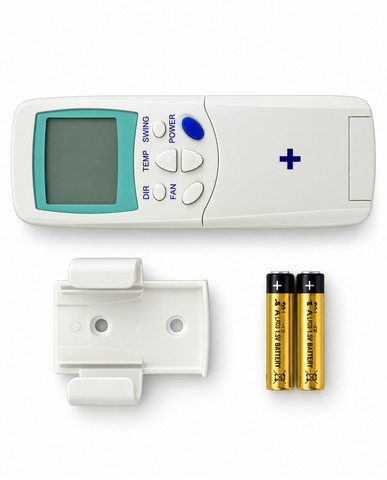
Ultra-Plus Remote Control Suits Virtually any Split system Air Conditioner.
A/C Ultra PlusRemote Control
The AC Ultra Plus Universal Air Conditioner Remote Control is Australia’s leading universal split-system replacement remote. It is compatible with over 10,000 models across 100+ major international and Australian brands—including Ample Air listings like Daikin, Fujitsu, Mitsubishi, Panasonic, Samsung, and LG.
Key Features
- Full Functional Controls: Manages temperature selection, fan speeds, wind direction/swing, and features a built-in clock/timer.
- High Compatibility: Replaces old OEM units or the previous AC-Ultra model with an expanded base of local Australian frequencies.
- Complete Package: Includes a digital readout screen, mounting dock, and AAA batteries
Quick Programming Guide
Setting up the Ultra Plus takes less than three minutes using one of two easy programming methods:
Method 1: Easy Automatic Search (Recommended)
- Turn on your wall-mounted air conditioner manually.
- Point the Ultra Plus remote directly at the indoor AC unit.
- Press and hold the "Select" (or "Set") button for approximately six seconds. The code numbers on the digital screen will begin to flash.
- Release the button. The remote will now automatically cycle through codes.
- Listen closely. The moment your air conditioner beeps or turns off, immediately press the "Enter" (or "OK") button to lock the code in.
Method 2: Manual Code Entry
- Find your air conditioner brand's specific numbers in the code sheet inside the user manual.
- Press the "Select" button so the screen digits blink.
- Use the "+" or "-" (Up/Down) temperature keys to manually scroll to your brand's designated code.
- Once your AC unit responds (beeps or reacts), press "Enter" to save it
Use only the highest quality Universal Spare Parts supplied by appliance manufacturers.