

Brand:ULTRA PLUS
Ultra-Plus Remote Control - - Doug Smith Spares
Sold by JB Hi-Fi In stock

Same price since 15 Nov
Unchanged since we started tracking
We may earn a commission at no cost to you. How it works
Price history
Tracking since yesterday
The price hasn't changed since we started tracking it. We'll show its history once it does.
About this product
- Brand
- ULTRA PLUS
- Store
- JB Hi-Fi
- Category
- Home & Garden > Household Appliance Accessories > Air Conditioner Accessories > Air Conditioner Remote Controls
- SKU
- 10103432
Ultra-Plus Remote Control Suits Virtually any Split system Air Conditioner.
A/C Ultra PlusRemote Control
The AC Ultra Plus Universal Air Conditioner Remote Control is Australia’s leading universal split-system replacement remote. It is compatible with over 10,000 models across 100+ major international and Australian brands—including Ample Air listings like Daikin, Fujitsu, Mitsubishi, Panasonic, Samsung, and LG.
Key Features
- Full Functional Controls: Manages temperature selection, fan speeds, wind direction/swing, and features a built-in clock/timer.
- High Compatibility: Replaces old OEM units or the previous AC-Ultra model with an expanded base of local Australian frequencies.
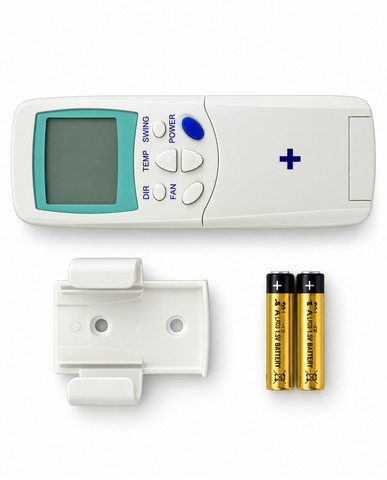
- Complete Package: Includes a digital readout screen, mounting dock, and AAA batteries
Quick Programming Guide
Setting up the Ultra Plus takes less than three minutes using one of two easy programming methods:
Method 1: Easy Automatic Search (Recommended)
- Turn on your wall-mounted air conditioner manually.
- Point the Ultra Plus remote directly at the indoor AC unit.
- Press and hold the "Select" (or "Set") button for approximately six seconds. The code numbers on the digital screen will begin to flash.
- Release the button. The remote will now automatically cycle through codes.
- Listen closely. The moment your air conditioner beeps or turns off, immediately press the "Enter" (or "OK") button to lock the code in.
Method 2: Manual Code Entry
- Find your air conditioner brand's specific numbers in the code sheet inside the user manual.
- Press the "Select" button so the screen digits blink.
- Use the "+" or "-" (Up/Down) temperature keys to manually scroll to your brand's designated code.
- Once your AC unit responds (beeps or reacts), press "Enter" to save it
Use only the highest quality Universal Spare Parts supplied by appliance manufacturers.