

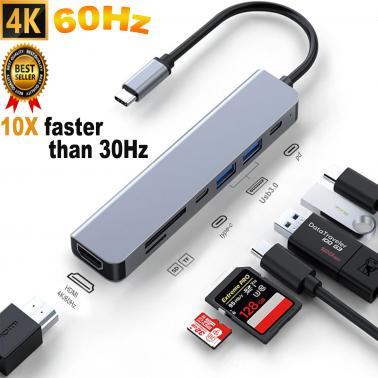
USB C Hub 7 in 1 USB C to HDMI Adapter 4K@60Hz USB 3.0 Hub USB C Docking Station USB Splitter USB Expander Multiport Adapter USB C Adapter USB Dongle
In stock at MSY
Price checked today
We may earn a commission if you buy; it doesn't change your price. Check the price at MSY before you buy. How we make money
Price history
Tracking since today
The price hasn't changed since we started tracking it. We'll show its history once it does.
About this product
MultiPort USB C Hub 7-in-1 USB-C Splitter can improve stability when multiple interfaces work simultaneously. The intelligent USB C Adapter has perfectly combined all the functions you need. Convenient for home entertainment, office, exhibition, demonstration, teaching, etc. Use our intelligent USB hub to expand monitors. Provides you the extensive workspace and flexibility to solve any task usb hub.Clear Visual EnjoymentMulti-port Adapter mirrors or extend your screen with USB C hubs HDMI port and directly stream 4K UHD @60Hz or full HD 1080P video to HDTV, monitor or projector.Provides you with lifelike images that bring an immersive 3D resolution experience. ideal for conference presentations, games or home theaters with excellent visual experience. Note: Ensure your USB-C devices support DP Alt Mode for video transmission and wall charger not included docking station.Superfast data transfer & Convenient SD/TF Card Reader The USB 3.0 port offers transfer speed up to 5Gbps which enables you to access files within seconds; USB C Adapter only needs a few seconds to complete the reading speed, super fast to upload and download your data; SD and TF card slots support secure reading and writing speed for browsing photos instantly. suitable for photographer or designer etc splitter multiport.Plug & Play and Super-fast Charging USB C Hub Plug and Play, without any software and driver installation. The 100W PD port provides a continuous charging speed to your computers at up to 100W without occupying the scanty ports, make sure you transfer files or streaming media smoothly usb adapter.Wide Compatibility USB-C hub adapter is compatible with all devices that include Type-C/USB ports, especially for MacBook Pro and Air. Multi-port adapter accommodating a variety of devices. The USB Type c 3.0 hub can be used for USB flash drive, camera, mobile hard disk, mouse, keyboard or other USB 2.0/USB 3.0 devices hdmi splitter. USB HUB are becoming increasingly popular as more and more people are working remotely or using multiple devices. With a USB HUB, you can connect all of your peripherals, including external monitors, keyboards, mice, and storage devices, to your laptop or tablet. But with so many options on the market, how do you choose the best one for your needs ? In this article, we'll provide you with a comprehensive guide to selecting the best USB HUB.CompatibilityBefore purchasing a USB HUB, ensure that it is compatible with your laptop or tablet. Not all USB HUB are universal, and some only work with specific brands or models. Check the compatibility information before making a purchase.PortsThe number and types of ports a USB HUB has are critical factors to consider. The more ports a USB HUB has, the more devices you can connect to it. Consider the types of devices you'll be connecting and ensure that the USB HUB has the ports you need.DisplayIf you plan on connecting an external monitor to your USB HUB, ensure that it supports the resolution and refresh rate of your monitor. Look for a USB HUB with a high-speed HDMI or DisplayPort that can support 4K resolution at 60Hz.Size and DesignConsider the size and design of the USB HUB you're interested in purchasing. If you're looking for a portable USB HUB, opt for a smaller, lightweight option that's easy to carry with you. If you're setting up a workstation at home, a larger USB HUB with a sleek design might be a better choice.In conclusion, choosing the best USB HUB requires careful consideration of compatibility, ports, power delivery, display, size and design, price. By following these guidelines, you'll be able to select a USB HUB that meets all of your needs and provides a seamless, efficient work experience.