

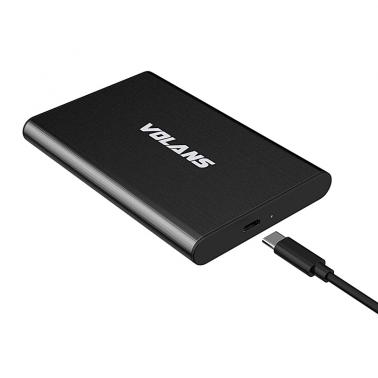

Volans 2.5in Aluminium USB Type C HDD Enclosure (VL-UC25S)
Price$13
In stock at Umart
Price checked today
We may earn a commission if you buy; it doesn't change your price. Check the price at Umart before you buy. How we make money
Price history
Tracking since today
The price hasn't changed since we started tracking it. We'll show its history once it does.
About this product
Volans 2.5in Aluminium USB Type C HDD Enclosure
Supports 2.5 inch SATA I/II/III HDD (9.5mm) up to 6TB
SuperSpeed USB 3.1 Interface, backwards compatible with USB 3.0/2.0/1.1
Easy installation allow to mount Hard Drive in seconds
Plug and play and hot-swappable, no additional driver needed
LED light indicates power and activity status
Dimensions: 120 (L) x 77 (W) x 13(H)
Compatible with Windows 2000 / XP / VISTA/7/8/10, Mac OS 9.X and Linux2.4.2 and above
SPECIFICATIONS:
| HARDWARE | |
|---|---|
| Chipset ID | JMS576 |
| Compatible Drive Types | SATA |
| Drive Installation | Tool-less |
| Drive Size | 2.5in |
| Fan(s) | No |
| Number of Drives | 1 |
| PERFORMANCE | |
| Max Drive Capacity | Currently tested with up to 6TB hard drives |
| RAID | No |
| Type and Rate | 6Gbps (Max) |
| UASP Support | Yes |
| CONNECTOR(S) | |
| Drive Connectors | 1 – SATA Data & Power Combo (7+15 pin) Receptacle |
| Host Connectors | 1 – USB-C Female |
| SOFTWARE | |
| OS Compatibility | Windows/Mac/Linux |
| INDICATORS | |
| LED Indicators | 1 – Power & Activity |
| POWER | |
| Power Source | Type-C Port Power Supply |
| ENVIRONMENTAL | |
| Humidity | 10%RH ~ 95%RH |
| Operating Temperature | 0°C to 40°C (32°F to 104°F) |
| Storage Temperature | -10°C to 65°C (14°F to 149°F) |
| PHYSICAL CHARACTERISTICS | |
| Color | Black |
| Enclosure Type | Aluminium |
| Max Drive Height | 9.5 mm |
| WHAT’S IN THE BOX | |
| Included in Package | 1 – USB-C to 2.5″ SSD/HDD Enclosure 1 – USB-C (M) to USB-A (M) Cable 1 – USB-A (F) to USB-C (M) adapter 1 – Install Guide |