

Brand:Wacom
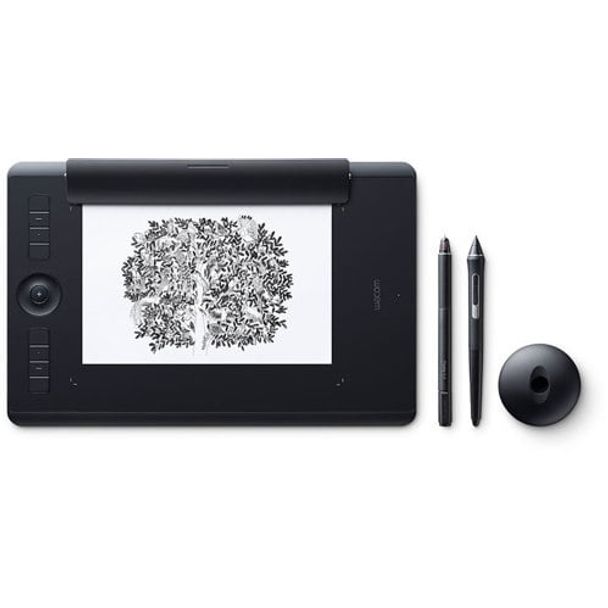
WACOM PTH-660/K1-C Intuos Pro Medium with PRO PEN 2 TECH+PAPER
Sold by Computer & Parts Land In stock

Same price since 16 Nov
Unchanged since we started tracking
We may earn a commission at no cost to you. How it works
Price history
Tracking since today
The price hasn't changed since we started tracking it. We'll show its history once it does.
About this product
- Brand
- Wacom
- Store
- Computer & Parts Land
- Category
- Electronics > Electronics Accessories > Computer Accessories > Stylus Pens
- SKU
- TAB-WAC-660K1C
Specifications
- Colour
- Black
New Wacom Pro Pen 2: natural and precise
Our new Wacom Pro Pen 2 is designed to quickly become a natural extension of your hand. Its exceptional sensitivity and responsiveness gives you the control you need to take your work to the next level.

Outstanding pressure
sensitivity

Natural tilt support

Virtually no lag

No batteries or recharging
An age-old way to be creative, brought up to date
Wacom Intuos Pro Paper Edition adds a new medium to your digital workflow - paper.
Paper-to-digital workflow, step by step:
1. Clip your favorite drawing paper on the surface of the Wacom Intuos Pro Paper Edition and sketch with that familiar feel. Work on A5 paper (half-letter size) with our Medium model and A4 paper (letter size) with the Large model.
2. As you draw with the Finetip Pen (or optional Ballpoint Pen), Wacom Intuos Pro Paper Edition captures every stroke as an editable file that can be opened in your favorite creative software.
3. You don't need to be connected to a computer or the internet; Wacom Intuos Pro Paper Edition will store up to 200 multi-layered or 1000 one-layered drawings, ready for you to access on other devices
4. Connect Wacom Intuos Pro Paper Edition to your computer with USB. Using Inkspace*, you can sync, store and export your sketches in common creative file formats - including layered raster and vector.
5. Continue your work with your Wacom Intuos Pro attached to your computer and the sensitive new Wacom Pro Pen 2.
* Requires registration and a Wacom ID
Slim and sleek design

Wacom Intuos Pro Paper Edition comes in both Medium and Large sizes. Each has a smaller, more compact footprint than previous models. Wacom Intuos Pro is built using premium materials such as black anodized aluminum and fiberglass composite resin. The result is a pen tablet that feels reassuringly strong but is a mere 8mm thick.


Convert your paper sketches to layered raster and vector formats
Wacom Intuos Pro Paper Edition comes with invaluable Inkspace features* specifically designed for artists and designers. They give you total, flexible control over your work:
- Export your work in layered raster or vector formats (such as PSD and SVG)
- Sync your creations across multiple devices**
- Share your creative projects with colleagues and clients
*Requires registration and a Wacom ID
**Available for mobile from February 2017
Explore Inkspace
Work your way
Wacom Intuos Pro Paper Edition is designed to let you focus on what’s important – your creativity.

Customizable ExpressKeys™ and Touch Ring provide quick and easy shortcuts for everyday tasks.

Multi-touch gestures make navigating around your work as simple as using your smartphone.

Wacom Pro Pen 2’s side switches put shortcuts and controls literally at your fingertips.

Nail every detail with our 0.4mm diameter Finetip Pen - a smooth gel-ink pen with replaceable refills* that works in harmony with Wacom Intuos Pro Paper Edition.

Choose from three different Texture Sheets* to change the feel of your Wacom Intuos Pro. Each simulates different drawing papers, from smooth to rough.
* Sold separately
Choose your Wacom Intuos Pro Paper Edition
Wacom Intuous Pro Paper Edition is available in two sizes. Medium is lighter and more compact, ready to slip into your bag and take wherever you need to sketch. Large offers the most expansive drawing area.

Wacom Intuos Pro Paper Edition M
338 x 219 x 8mm / 13.2 x 8.5 x 0.3 in
Wacom Pro Pen 2
8192 pen pressure levels
8 ExpressKeys™
Built-in Bluetooth connectivity
Wacom Finetip Pen
Paper Clip
A5 paper sheets (half-letter size)
Accessory Soft Case
- Product Type Creative Pen Tablet
- Model Number Medium: PTH-660P
- SizeMedium: 338 x 219 x 8 mm / 13.2 x 8.5 x 0.3 in
- Active AreaMedium: 224 x 148 mm / 8.7 x 5.8 in
- WeightMedium: 700g/ 1.54lbs
- Color Black
- Multi-TouchYes
- Stylus Wacom Pro Pen 2
Finetip Pen (for paper sketching)
Ballpoint Pen (optional - for paper sketching) - Stylus TypePressure-sensitive, cordless, battery-free
- Pen Pressure Levels8192, both pen tip and eraser (on Pro Pen
8192 on Finetip Pen and Ballpoint Pen
(optional) - Tilt Recognition± 60 levels
- Switches2 side switches on pen, Touch on/off switch on tablet
- Replacement Nibs10 Pro Pen 2 nibs (6 standard and 4 felt nibs in pen stand); 3 Finetip refills
- Desktop Pen StandYes
- GripLatex-free silicone rubber (Pro Pen 2, Finetip
Pen and optional Ballpoint Pen) - TechnologyPatented electromagnetic resonance method
- Resolution5080 lpi
- ExpressKeys™8 customizable, application-specific
- Touch RingYes - 4 customizable functions plus home button for capturing layers in paper mode
- Express View Display (hud)Yes
- Radial MenuYes
- Display ToggleYes
- Dedicated Pan, Scroll, Zoom, Brush SizeYes
- Precision ModeYes
- Cable Included2 m (6.6 ft) PVC-free USB cable
- PC And Mac ConnectionUSB or Bluetooth Classic for wireless connection
- Wireless IncludedYes - Bluetooth Classic for connecting to
PC or Mac, Bluetooth LE* for connecting to
mobile devices (in paper mode)
*Available in February 2017 - Paper Size (for paper sketching)A5/Half Letter for Medium tablet
A4/Letter for Large tablet - Max # of Pages Stored (for paper sketching)200 pages with unlimited layers
on tablet - no connection necessary - System RequirementsUSB port, Windows® 7 or later (64bit),
Mac OS 10.10 or later, Bluetooth Classic
for wireless connection to PC or Mac,
Bluetooth 4.1 LE for wireless connection to
mobile devices (in paper mode),
Internet connection to download driver* and
software
*Download and installation of driver is
required to make product work. - Limited Warranty2 years in USA, Canada, and Latin America, 1 year China, 1 Year in AP, 1 Year in Japan, 2 Years in Europe
- CertificationsUS: FC, CEC (California Energy Commision), RBRC, Mercury Labeling Requirements
Canada: IC, ENERGY EFFICIENCY STANDARDS REGULATION
Colombia: Commission de Regulacion de Telecomunicaciones
Costa Rica: SUTEL
Panama: Autoridad Nacional de los Servicios Públicos
Uruguay: URSEC
Guatemala: SIT
Nicaragua: Telcor
El Salvador: Superintendencia General de Electricidad y Telecomunicaciones
Bolivia: SITTEL
Dominican Republic: INDOTEL
Trinidad and Tobago: TATT - CertificationsEU/EEA/SW/Turkey: CE, RoHS
Kuwait: Ministry of Communications
Japan: VCCI, Radio Act
China: SRRC (CMIIT), China RoHS, GB
Australia/New Zealand: RCM, IDA
Singapore: IDA - What's IncludedWacom Intuos Pro Pen Tablet (Medium or
Large) Wacom Pro Pen 2 (battery-free)
Pen stand (includes 6 standard nibs, 4 Felt
nibs)
Finetip Pen (Battery-free)
Paper Clip
10 single Paper sheets - A5 or A4 (depending
on tablet size)
Accessory soft case
4 extra pen color rings
3 finetip ink refills
Texture sheet sample card,
2m (6.6ft) PVC-free USB cable
Quick start guide - AccessoriesWacom Ballpoint Pen,
Wacom standard nibs (5 pack),
Wacom felt nibs (5 pack),
Wacom Finetip refills (5 pack),
Wacom Ballpoint refills (3 pack),
Wacom Soft Case - Medium or Large,
Wacom Texture Sheets - smooth, standard, and rough,
Prior generation pens (Pro, Classic, Art, Airbrush, Grip)
Wacom Paper Clip (replaceable),
Wacom Finetip Pen (replaceable),
Wacom Pro Pen 2 with case (replaceable) - Included ServicesInkspace Basic subscription. Includes 5GB
storage, sync, export, download and share
features. Supports export to PSD, SVG, PNG,
JPG, and WILL formats. Wacom ID required.