

Brand:Yunzii
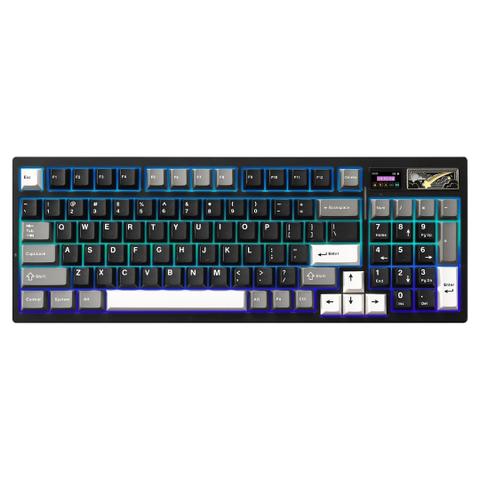
YUNZII IF99 Full Size Wireless Mechanical Keyboard – Black, Cocoa Cream V2 Switch
Best price PC Case Gear In stock

PC Case Gear's lowest tracked price
Tracking since 8 Nov
Cheapest of 6 stores
Compare all
We may earn a commission at no cost to you. How it works
Price history
Tracking since 8 Nov · 11 days
- Now
- $129
- Lowest
- $129
- Highest
- $149
Price changes
- down↓13% 12 Nov $129
- First recorded 8 Nov $149
Available at 6 stores
Stores may pay us a commission when you buy; it doesn't affect the order or your price. Learn more




About this product
- Brand
- Yunzii
- Category
- Electronics > Electronics Accessories > Computer Components > Input Devices > Keyboards
Specifications
- Colour
- Black
Epic Price! The YUNZII IF99 Tri-Mode Hot-Swap Mechanical Keyboard in black is a feature-rich 96% layout keyboard that combines a full numpad with a compact design, ideal for both productivity and gaming setups. It boasts tri-mode connectivity (Bluetooth 5.0, 2.4GHz wireless, and USB-C wired), hot-swappable switches, south-facing RGB, QMK/VIA programmability, a customisable LCD screen, and an impressive 8000mAh battery for extended wireless use.
Features
YUNZII IF99 QMK/VIA Full Size LCD Mechanical Keyboard with NumPad and Screen
Custom LCD Keyboard for Personalised Display
YUNZII IF99 wireless mechanical keyboards feature a customisable LCD screen that can display time, GIFs, photos, battery status, connection mode, and more. Personalise it with your favourite images, like pets or loved ones, to keep you motivated during work or gaming. Enjoy an added touch of personalisation that sets your computer keyboard and screen apart.
- 95-key Mechanical Keyboard
- Support QMK/VIA Customisation
- Mac/Win/Linux/Android System
- Hot Swappable
- Aluminium Magnetic Badge
- LCD Design
- BT/2.4G/Wired
- 8000 mAh Build-in battery

Part Diagram
1. Type-C Port
2. Tri-Mode Switch: 2.4G/Wired/Bluetooth
3. Caps Lock Indicator
4. LOG LED
5. LCD Screen
6. 2.4G Dongle Storage Bin
7. Badge
8. Num Lock

Tri-Mode Compatibility
Tri-Mode Connectivity & Long-Lasting Battery
YUNZII IF99 wireless mechanical keyboard provides three connection methods and easily switches between BT5.0, 2.4GHz wireless, and USB-C wired modes. The Win / Mac keyboard connects up to 5 devices, like tablets, PC, phones, laptops, and even gaming consoles like PS and Xbox. With the high-capacity 8000mAh battery, and 1000hz polling rate of the mechanical keyboard wireless, you can work and game longer without frequent recharges, designed to keep you focused on gaming, work, or programming without frequent recharging.
- Bluetooth: FN+1/2/3 Easy and Convenient
- 2.4GHz Wireless: FN+4 Stable and Fast
- Type-C Wired Connection: Plug and play

Design for Win/Mac/Android
Gasket Mount Hot Swappable Gaming Keyboard

Gasket Mount Structure - 5-Layer Dampening Design
This creamy keyboard with number pad features a gasket-mounted design with multiple layers of sound-absorbing material, reducing noise and enhancing typing comfort.

Hot Swappable Keyboard
The full-key hot-swappable thocky keyboard allows you to easily swap out 3-pin or 5-pin switches to customise the tactile keyboard feel and creamy keyboard sound of every keystroke.
Pre-lubed Switches and Stabilisers Smooth, creamy sounding.
- Hot Swap PCB support 3/5 pins switches
- Pre-Lubed Linear Switches

Unique Typing Experience
- Noise Reduction
- Sound Absorption
- High Resilience
- Ergonomic Design (Typing Comfortable)
- Pre-Lubed Stabiliser (Smoother Typing)
- 5-Layer Sound Fillings (Creamy Keyboard)
QMK/VIA Programmable
QMK/VIA Custom Keyboard for Full Control
Compatible with QMK and VIA software, the IF99 custom mechanical keyboard allows easy customisation via Windows and macOS. Modify key mappings, create custom shortcuts, adjust RGB lighting effects, and more with this open-source platform. Achieve a truly personalised typing experience tailored to your typing, programming, or gaming needs.
QMK/VIA custom keyboard is ideal for gaming and professional work.
- RGB Design: Personalise your own backlighting
- Macro Editing: Combine multiple shortcuts in one key
- Remap keys: Personal customise keys to improve efficiency
Premium Double Shot PBT Keycaps
- Extra Mac system keycaps
- Cherry profile keycaps
RGB Backlight Shortcuts
Vibrant RGB Lighting & Customisable Magnetic Badge
The creamy keyboard’s south-facing LEDs offer dynamic 16.8 million RGB colours, 8 single backlit and south-facing LEDs. As a gaming accessory, this creamy mechanical keyboard is perfect for gaming in dark environments. A magnetic, colourful metal badge enhances the RGB keyboard’s aesthetic while hiding the 2.4GHz receiver for a sleek look, elevating your gaming setup aesthetic with a premium and textured look.
- Fn + Backspace : Backlight Effect ON/OFF
- Fn + | : Change Backlight Effect
- Fn + Enter : Change Backlight Colour
- Fn + ↑ : Brightness ↑
- Fn + ↓ : Brightness ↓
- Fn + → : Blinking Speed ↑
- Fn + ← : Blinking Speed ↓
16.8 Million RGB Backlit
- Multiple RGB colours
- South-facing LEDs
- Shortcuts to change RGB settings
- QMK/VIA to customise RGB
Customisable LCD Screen Design
- HOME PAGE: Fn+8 Time/Battery/Connection Mode/Layout and more
- PICTURE PAGE: Fn+9 Showcase your uploaded pictures
- GIF PAGE: Fn+0 Web software to customise the GIF page
2.4 GHZ Wireless Connection (Fn+4)
1. Switch the mode button to the 2.4G position
2. Long press Fn+4 to the 2.4g wireless mode
3. 2.4G Dongle Storage Bin
4. Plug 2.4g dongle into your device
Bluetooth Mode (Fn + 123)
1. Switch the mode button to the BT position
2. Short press Fn+1/2/3 to choose a Bluetooth channel
3. Select the YUNZII IF99 BT1/BT2/BT3 to connect it
4. Select the YUNZII IF99 BT1/BT2/BT3 to connect it

Aesthetic Design with More Details
QMK/VIA Connection
1. Connect the computer in wired mode and download the JSON file of the corresponding model from the official website of YUNZII.
2. Open the VIA website: https://usevia.app/and click "Authorise device" to connect with the device.
3. Open the VIA website: https://usevia.app/and click "Authorise device" to connect with the device.
4. Open the DESIGN page on the VIA website and upload the json file downloaded from YUNZII.
5. After the connection is completed, custom settings can be used.
Fast Charging, Long Lasting
Press the Fn+Right Ctrl to check the battery level,
- 8000mAh
- Fast Charging
- Power for Days
- 36 hours RGB ON
- 130 hours RGB OFF
- 18 hours Charging