

Brand:TP-Link
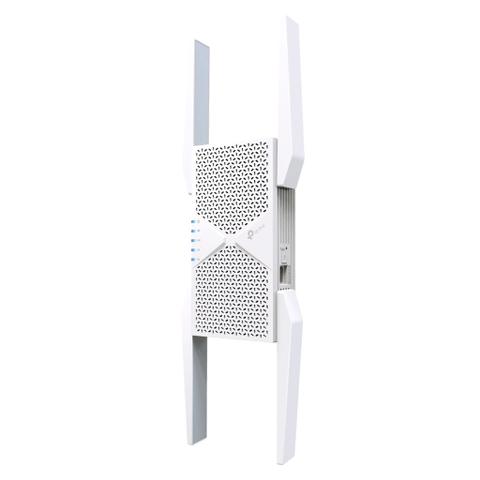
TP-Link RE655BE BE9300 Tri-Band Wi-Fi 7 Range Extender
Best price Mwave In stock

Mwave's price unchanged since 18 Nov
Tracking since 29 Oct
Cheapest of 9 stores
Compare all
We may earn a commission at no cost to you. How it works
Price history
Tracking since 29 Oct · 21 days
- Now
- $345.77
- Lowest
- $43.53
- Highest
- $392.92
Latest price changes
- down↓1% yesterday $345.77
- down↓11% 2 days ago $349
- up↑803% 10 Nov $392.92
- down↓89% 9 Nov $43.53
- First recorded 29 Oct $392.92
Available at 9 stores
Stores may pay us a commission when you buy; it doesn't affect the order or your price. Learn more
- Mwave $345.77 Cheapest In stock Checked today
- Computer Alliance $349 In stock Checked today
- MSY $349 In stock Checked today
- PC Case Gear $349 In stock Checked today
- The Good Guys $349 In stock Checked today
- Umart $349 In stock Checked today
- PC LAN $429 In stock Checked today
- JW Computers $449 In stock Checked 3 days ago
- Centre Com $349 Out of stock Checked today
- Scorptec $449 No longer listed Last seen 11 Nov







About this product
- Brand
- TP-Link
- Category
- Electronics > Networking > Network Cards & Adapters > Wi-Fi Network Cards & Adapters
The TP-Link RE655BE BE9300 Tri-Band Wi-Fi 7 Range Extender boosts wireless coverage on an existing network. It connects wirelessly to a router and can also work in access point mode, where its 2.5 Gbps LAN port turns a wired connection into a tri-band wireless signal.
The extender operates on 6 GHz, 5 GHz and 2.4 GHz bands, with signal rates of 5764 Mbps at 6 GHz, 2880 Mbps at 5 GHz and 688 Mbps at 2.4 GHz. It supports Multi-Link Operation (MLO), 320 MHz channels and 4K-QAM, and it is compatible with EasyMesh networks, so it can be added to an EasyMesh router or mesh system to extend coverage further. Smart Adaptive Roaming is designed to keep connections steady as devices move between areas of the home.
Setup can be done by pressing the WPS button on the router and the extender, or through the TP-Link Tether app on Android or iOS. Four external antennas support coverage across the space.
Key features
- Tri-band Wi-Fi 7 with 6 GHz, 5 GHz and 2.4 GHz bands
- Signal rates up to 5764 Mbps (6 GHz), 2880 Mbps (5 GHz) and 688 Mbps (2.4 GHz)
- 1 x 2.5 Gbps LAN port
- Range extender and access point working modes
- EasyMesh compatible
- WPA/WPA2-PSK and WPA3 security
- Setup via WPS button or Tether app
Written with AI from store descriptions
JW Computers
TP-Link BE9300 Tri-Band Wi-Fi 7 Range Extender
In stock Price from 16 Nov
JW Computers' price unchanged since 16 Nov
Other stores from $345.77
Buy at JW Computers · $449We may earn a commission at no cost to you. How it works
Price history
Tracking since 4 days ago
- Now
- $449
- Lowest
- $413.60
- Highest
- $449
Price changes
- up↑9% 3 days ago $449
- First recorded 4 days ago $413.60